

Your user profile
Benutzerprofil anpassen (edit user profile) shows a form to change a password. The form has no effect. You sign in to comrce cloudprint with your comrce Hub account, so your password belongs to comrce Hub. Change it there.
What you can do here
Section titled “What you can do here”- Nothing that changes your account. The button Passwort ändern (change password) doesn’t save anything. The screen at a glance
- Find where your password really lives. It’s your comrce Hub password, changed in the comrce Hub settings. Change your password in comrce Hub
The screen at a glance
Section titled “The screen at a glance”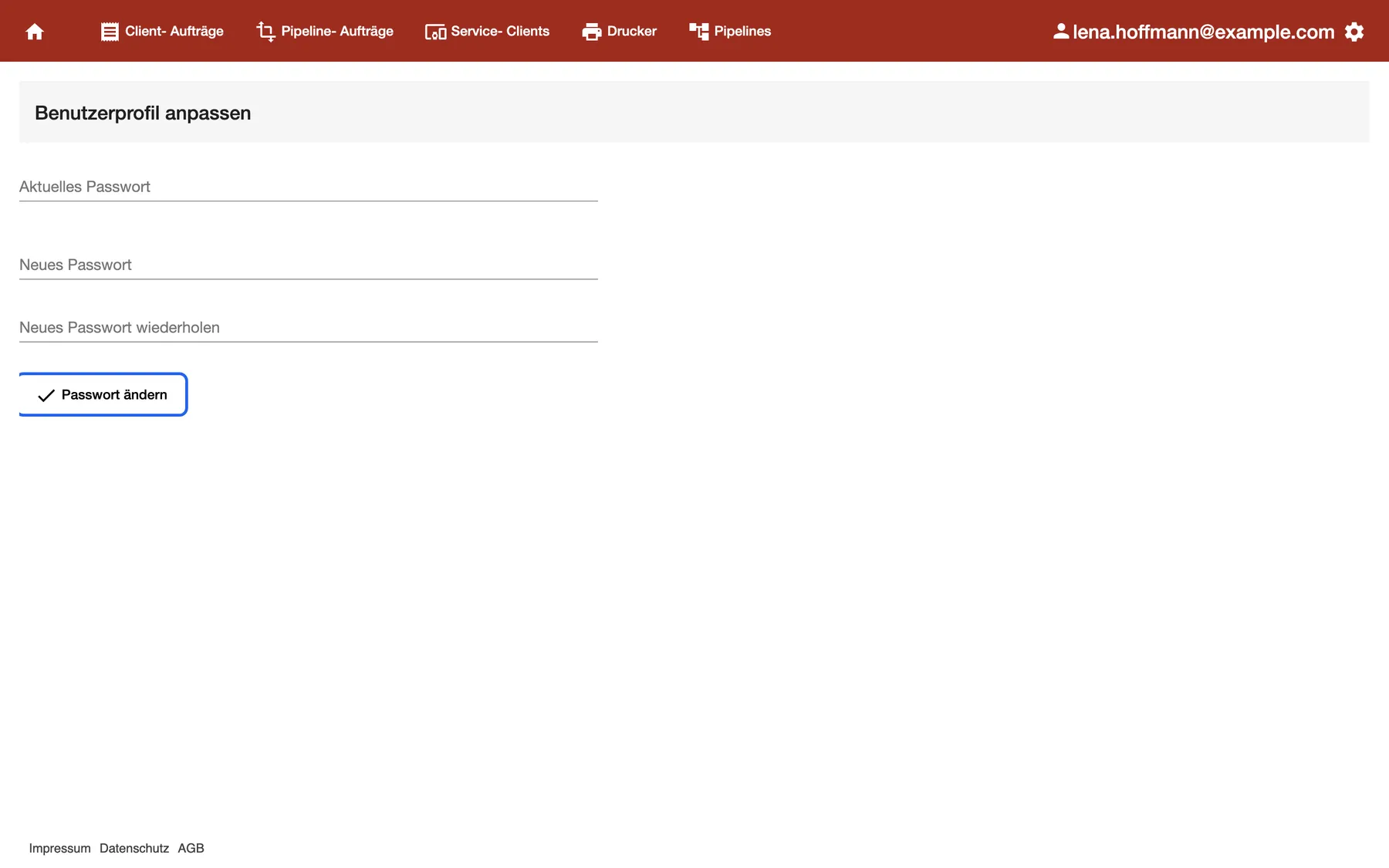
What this screenshot shows
- Screen
- Benutzerprofil anpassen
- Highlighted
- “Passwort ändern”: has no effect
- Also visible
- Three empty password fields
- Purpose
- why the password isn't changed here
No menu in comrce cloudprint links to this screen. Your email address at the right end of the red bar is only a label, not a menu. You reach the screen only by its address, /app/account/userprofile.
| Region | What it shows | What you do there |
|---|---|---|
| Heading Benutzerprofil anpassen | The name of the screen | Nothing |
| Three password fields | Aktuelles Passwort, Neues Passwort and Neues Passwort wiederholen | Nothing; what you type isn’t saved |
| Passwort ändern | A button with a tick | Nothing; it has no effect |
Change your password in comrce Hub
Section titled “Change your password in comrce Hub”comrce cloudprint opens through your comrce Hub sign-in. A new comrce Hub password therefore applies to comrce cloudprint too.
- Open comrce Hub and go to Settings from the user menu at the top right.
- Use Change Password there, as described in Settings.
- Open comrce cloudprint again from comrce Hub. It uses your new sign-in.
Every control, explained
Section titled “Every control, explained”
Every control, explained
Section titled “Every control, explained”The password form
Section titled “The password form”Benutzerprofil anpassen, the three fields and the button Passwort ändern.
The fields accept text, but the button doesn’t send it anywhere. Nothing changes, and no message appears.
comrce cloudprint has no password of its own for you. Your comrce Hub password is the one that counts.
Other controls on this page
| Control | What it does | Why |
|---|---|---|
| Aktuelles Passwort | Takes text; isn’t checked | Not needed |
| Neues Passwort | Takes text; isn’t saved | Not needed |
| Neues Passwort wiederholen | Takes text; isn’t compared | Not needed |
Frequently asked questions
Section titled “Frequently asked questions”
Frequently asked questions
Section titled “Frequently asked questions”General
Section titled “General”How do I change my comrce cloudprint password?
Section titled “How do I change my comrce cloudprint password?”Change your comrce Hub password. You sign in to comrce cloudprint with your comrce Hub account, so there’s no separate password. In comrce Hub, open Settings from the user menu and use Change Password.
Why does nothing happen when I select Passwort ändern?
Section titled “Why does nothing happen when I select Passwort ändern?”The button Passwort ändern on Benutzerprofil anpassen has no effect in comrce cloudprint. Your password belongs to comrce Hub. Change it in comrce Hub under Settings.
Where do I change my name or email address?
Section titled “Where do I change my name or email address?”In comrce Hub, under Settings in the user menu at the top right. comrce cloudprint has no fields for them. Its red bar shows the email address of your comrce Hub account at the right end.
I forgot my password. How do I get back into comrce cloudprint?
Section titled “I forgot my password. How do I get back into comrce cloudprint?”Reset your comrce Hub password on the comrce Hub sign-in page. Reset your password shows each step. Then sign in to comrce Hub and open comrce cloudprint from there. There’s no separate comrce cloudprint password to reset.
Does comrce cloudprint know my comrce Hub password?
Section titled “Does comrce cloudprint know my comrce Hub password?”No. comrce cloudprint never asks for it. You sign in on the comrce Hub sign-in page, and comrce Hub tells comrce cloudprint who you are. The password form on Benutzerprofil anpassen has no effect.
Does two-factor authentication protect comrce cloudprint too?
Section titled “Does two-factor authentication protect comrce cloudprint too?”Yes, when you’ve set it up in comrce Hub. The second factor is asked at your comrce Hub sign-in, which also opens comrce cloudprint. See Two-factor authentication for setting it up.
Why doesn’t the profile show my name?
Section titled “Why doesn’t the profile show my name?”Benutzerprofil anpassen shows only the three password fields and their button. Your name and email address live in your comrce Hub account. See and change them in comrce Hub under Settings.
Access
Section titled “Access”How do I open this screen?
Section titled “How do I open this screen?”No menu in comrce cloudprint links to Benutzerprofil anpassen. It opens only by its address, /app/account/userprofile. You don’t need it: everything about your sign-in is in comrce Hub under Settings.
Troubleshooting
Section titled “Troubleshooting”
Troubleshooting
Section titled “Troubleshooting”| Symptom | What to check |
|---|---|
| Passwort ändern does nothing | Expected. Change your password in comrce Hub under Settings. |
| Your email address at the top right doesn’t open a menu | Expected; it’s only a label. The gear next to it opens the settings menu, for the Owner only. |
| You forgot your password | Reset your comrce Hub password: Reset your password. |
| You can’t sign in to comrce cloudprint | Sign in to comrce Hub first. If that works, open comrce cloudprint from comrce Hub again. |
| You see Es konnte kein Account angelegt werden. | Your organization has no comrce cloudprint account yet. See No comrce cloudprint account was created. |