

Dashboard
The Dashboard is the start page of comrce cloudprint. It shows how many pages you printed in the current billing period and how many your plan includes. Charts show when and in which months you print. It opens after you sign in, and the house button at the left of the red bar brings you back.
What you can do here
Section titled “What you can do here”- Check your pages against your plan. The Accountstatus card compares printed, included and estimated pages for the billing period. Check your pages against your plan
- See when your printers are busy. A chart shows pages per hour for each of the last seven days. See when you print
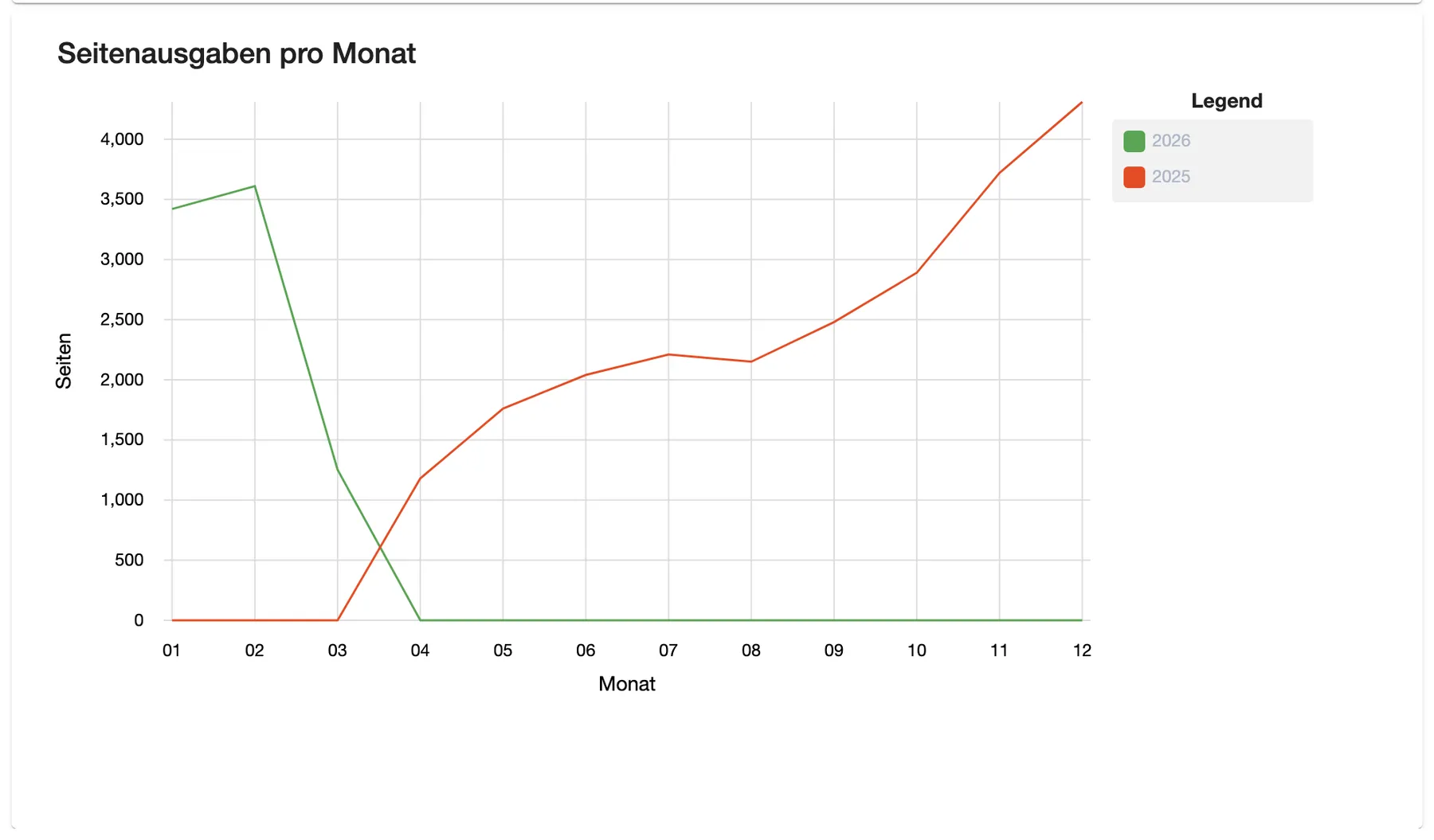
- Compare months. A second chart shows pages per month, this year against last year. See when you print
- Notice a block on printing. A red message in the card tells you when printing or the whole account is locked. When printing is locked
The screen at a glance
Section titled “The screen at a glance”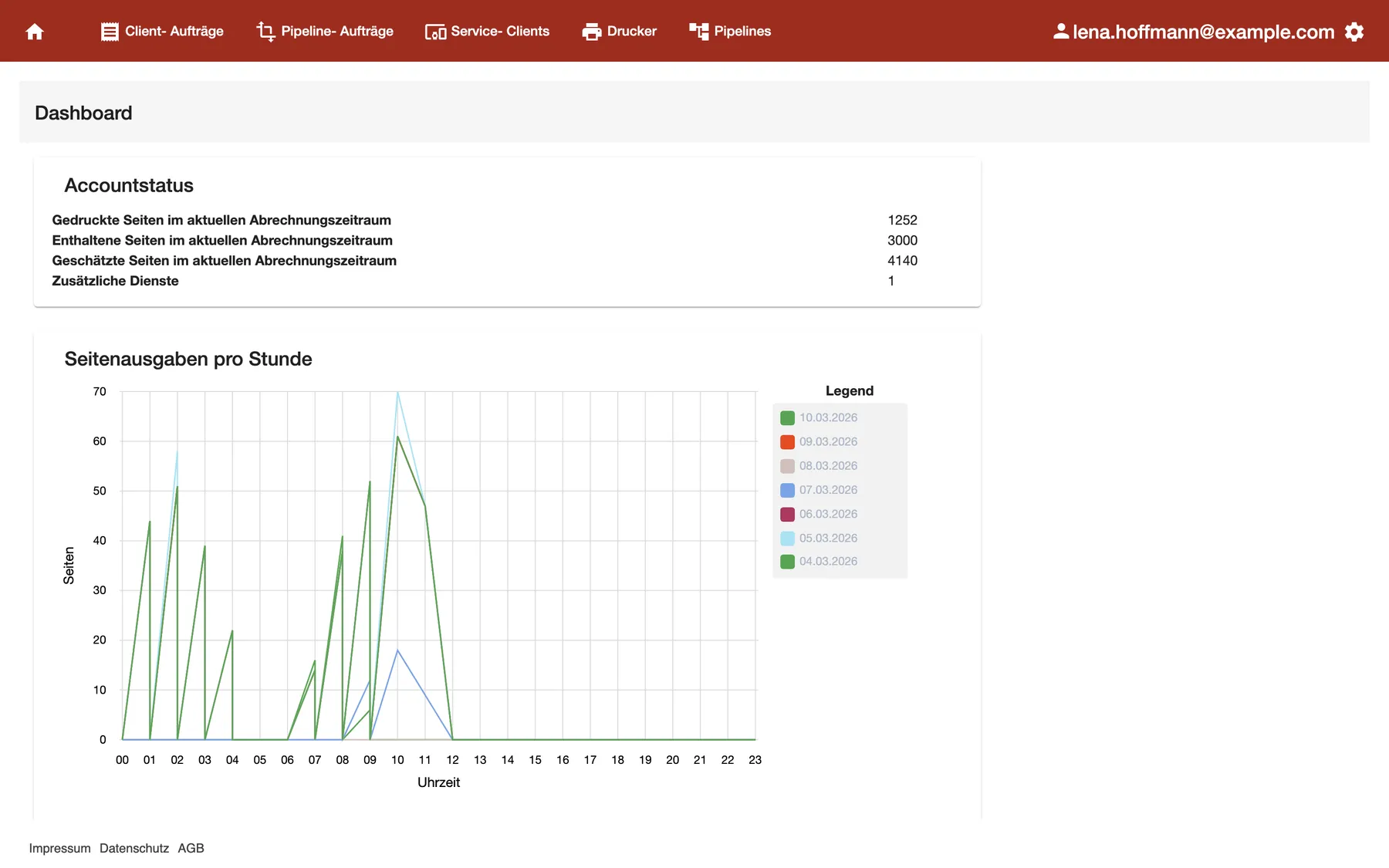
What this screenshot shows
- Screen
- Dashboard
- Also visible
- Accountstatus: 1252 printed, 3000 included, 4140 estimated, 1 additional service; Seitenausgaben pro Stunde with 7 days in the legend
- Purpose
- check pages against the plan
| Region | What it shows | What you do there |
|---|---|---|
| Red bar | The house button, the tabs, your email address and the settings gear | Move to another tab |
| Accountstatus | Pages of the billing period and additional Service Clients | Check your plan |
| Seitenausgaben pro Stunde | Pages per hour, one line per day of the last seven days | See your busy hours |
| Seitenausgaben pro Monat | Pages per month, this year and last year | Compare months |
| Seitenausgaben nach Ausgabe | Meant for pages per printer; empty at the moment | Nothing yet |
Check your pages against your plan
Section titled “Check your pages against your plan”The Accountstatus card has four lines. They count from your last invoice, or from the start of billing if there’s no invoice yet.
| Line | What it counts |
|---|---|
| Gedruckte Seiten im aktuellen Abrechnungszeitraum | Pages printed since the period started |
| Enthaltene Seiten im aktuellen Abrechnungszeitraum | Pages your plan includes for the whole period |
| Geschätzte Seiten im aktuellen Abrechnungszeitraum | The pages you’ll reach by the end of the period at your current pace. 0 until your first invoice. |
| Zusätzliche Dienste | Service Clients beyond the number your plan includes |
Example: on 10 March, your account shows 1252 printed pages. The plan includes 3000. At the current pace the period ends at 4140 pages, more than the plan includes. One Service Client counts as an additional service.
The card appears only when your account has a plan. Without one, the start page shows the charts only.
See when you print
Section titled “See when you print”Seitenausgaben pro Stunde has one line per day for the last seven days. The legend on the right names each date. The time axis runs from 00 to 23.
Seitenausgaben pro Monat has one line for this year and one for last year. The months run from 01 to 12. Months still ahead show 0.
What this screenshot shows
- Screen
- Dashboard
- Also visible
- two lines: 2026 and 2025
- Purpose
- compare months
Seitenausgaben nach Ausgabe stays empty for now.
When printing is locked
Section titled “When printing is locked”A red message at the top of the Accountstatus card tells you that something blocks printing.
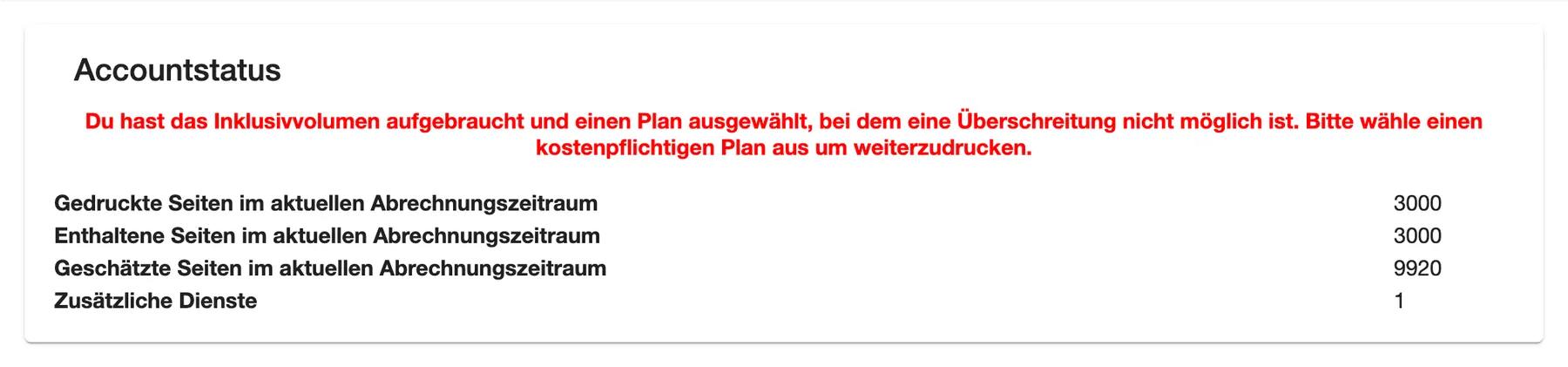
- Du hast das Inklusivvolumen aufgebraucht und einen Plan ausgewählt, bei dem eine Überschreitung nicht möglich ist. Bitte wähle einen kostenpflichtigen Plan aus um weiterzudrucken. Your plan doesn’t allow more pages than it includes, and they’re used up. Ask comrce support for a paid plan to print on.
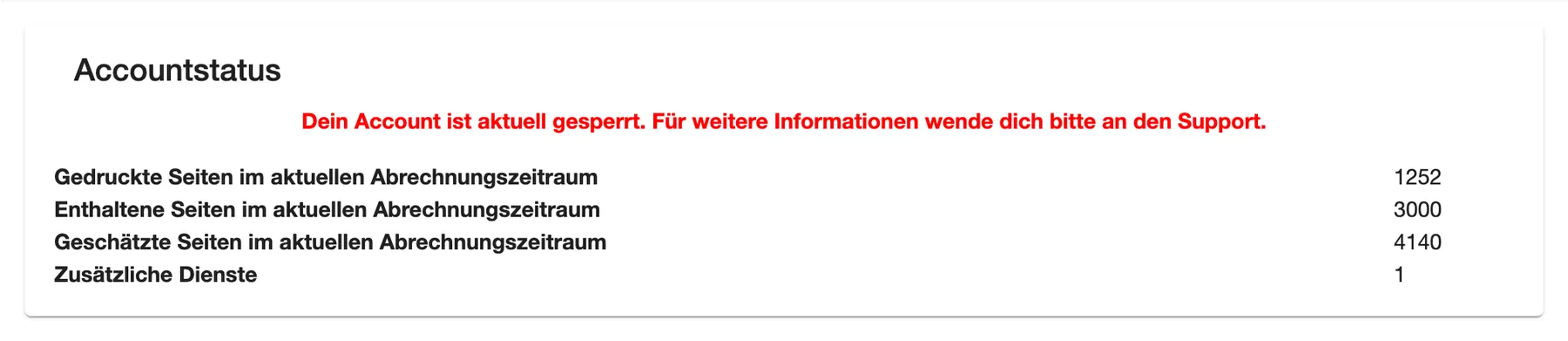
- Dein Account ist aktuell gesperrt. Für weitere Informationen wende dich bitte an den Support. Contact comrce support.
What this screenshot shows
- Screen
- Dashboard
- Also visible
- red message: included pages used up; 3000 printed of 3000 included pages
- Purpose
- recognise locked printing
What this screenshot shows
- Screen
- Dashboard
- Also visible
- red message: account locked, contact support
- Purpose
- recognise a locked account
Every control, explained
Section titled “Every control, explained”
Every control, explained
Section titled “Every control, explained”Estimated pages
Section titled “Estimated pages”Accountstatus card, third line.
Projects the pages printed so far to the end of the billing period, at the same pace. It stays 0 until your account has its first invoice.
A value above the included pages warns you early. You can then change your plan before the period ends.
Additional services
Section titled “Additional services”Accountstatus card, line Zusätzliche Dienste.
Counts the Service Clients beyond your plan’s number. A Service Client counts when it isn’t switched off and was online during the last 7 days.
Each additional Service Client can add to your bill. Switch off a computer you no longer use on Service Clients.
Pages per hour
Section titled “Pages per hour”Chart Seitenausgaben pro Stunde.
One line per day for the last seven days, hours 00 to 23. Afternoon hours appear at 01 to 11 at the moment. Point at a date in the legend to highlight its line.
Shows the times your printers and Service Clients must be on.
Other controls on this page
| Control | What it does | Why |
|---|---|---|
| House button in the red bar | Opens the start page | Come back to the overview |
| Legend entries | Point at one to highlight its line | Read a single day or year |
| Points on a line | Point at one to see its value | Read exact numbers |
Who sees what
Section titled “Who sees what”
Who sees what
Section titled “Who sees what”| Part of the page | Who sees it |
|---|---|
| Heading Dashboard | Everyone signed in to comrce cloudprint |
| Accountstatus and the charts | The comrce Hub Owner, as comrce cloudprint administrator, when the account has a plan |
| The charts without the card | The comrce Hub Owner, when the account has no plan |
Other members of your comrce Hub organisation see only the heading, and no tabs in the red bar.
Frequently asked questions
Section titled “Frequently asked questions”
Frequently asked questions
Section titled “Frequently asked questions”General
Section titled “General”Why is my start page empty apart from the heading?
Section titled “Why is my start page empty apart from the heading?”Only the comrce Hub Owner sees the card and charts, as the comrce cloudprint administrator. Other members of the organisation see only the heading Dashboard. Ask the Owner to check printing for you.
When does the billing period start?
Section titled “When does the billing period start?”The Accountstatus card on the start page counts from your last invoice. Before your first invoice it counts from the start of billing for your account. The included pages cover the whole period of your plan.
Why is the Accountstatus card missing?
Section titled “Why is the Accountstatus card missing?”The start page shows the Accountstatus card only when your comrce cloudprint account has a plan. Without a plan there’s nothing to compare against, and the start page shows the charts only.
Pages and plan
Section titled “Pages and plan”Why are the estimated pages 0?
Section titled “Why are the estimated pages 0?”Geschätzte Seiten im aktuellen Abrechnungszeitraum on the start page needs your first invoice to work out your pace. Until then it shows 0. The printed and included pages are correct from the start.
What happens when I print more pages than my plan includes?
Section titled “What happens when I print more pages than my plan includes?”It depends on your plan. A plan that allows more pages keeps printing. On a plan that doesn’t, printing stops, and the start page shows a red message. Choose a paid plan on your account to print on.
What counts as an additional service?
Section titled “What counts as an additional service?”The line Zusätzliche Dienste on the start page counts the Service Clients beyond your plan’s number. A Service Client counts when it isn’t switched off and was online during the last 7 days.
Charts
Section titled “Charts”Why does the hourly chart show printing at night?
Section titled “Why does the hourly chart show printing at night?”The chart Seitenausgaben pro Stunde on the start page counts hours on a 12-hour clock at the moment. Pages printed at 13:00 appear at 01, pages from 17:00 at 05. A peak at night is usually your afternoon.
Why is the chart for pages per printer empty?
Section titled “Why is the chart for pages per printer empty?”The chart Seitenausgaben nach Ausgabe on the start page receives no data at the moment and stays empty. See which printer printed what on Client-Aufträge, where each job shows its printer.
Which pages do the charts count?
Section titled “Which pages do the charts count?”The charts on the start page count the pages comrce cloudprint recorded for billing, over the last two years. The hourly chart covers the last seven days, the monthly chart this year and last year.
Troubleshooting
Section titled “Troubleshooting”
Troubleshooting
Section titled “Troubleshooting”| Symptom | What to check |
|---|---|
| Du hast das Inklusivvolumen aufgebraucht und einen Plan ausgewählt, bei dem eine Überschreitung nicht möglich ist. Bitte wähle einen kostenpflichtigen Plan aus um weiterzudrucken. | Your plan’s pages are used up and the plan doesn’t allow more. Ask comrce support for a paid plan. |
| Dein Account ist aktuell gesperrt. Für weitere Informationen wende dich bitte an den Support. | Contact comrce support. |
| Only the heading Dashboard appears | You aren’t the comrce Hub Owner. Only the Owner manages comrce cloudprint. |
| Peaks at night in the hourly chart | The chart counts on a 12-hour clock. Read 01 to 11 as possibly 13:00 to 23:00. |
| Zusätzliche Dienste is higher than expected | Switch off Service Clients you no longer use on Service Clients. |