

API access
Partner apps such as Billbee send documents to comrce cloudprint through its API. Three screens decide who gets in. One lists the partners approved in the browser. One holds credentials with a password, and one holds your own key. Open them from the gear at the top right.
What you can do here
Section titled “What you can do here”- See which partners can reach your account. OAuth API Zugriff (partner access) lists every approved partner. It shows who approved it and when it last connected. See and switch off partner access
- Cut a partner off. Switch an access off for a while, or delete it for good. See and switch off partner access
- Give a partner a user name and password. Einfachen API Zugriff (simple API access) holds one set of credentials per partner, each with its own permissions. Set up simple API credentials
- Connect your own programs. A private API key lets your own software or scripts print through comrce cloudprint. Create your private API key
The screen at a glance
Section titled “The screen at a glance”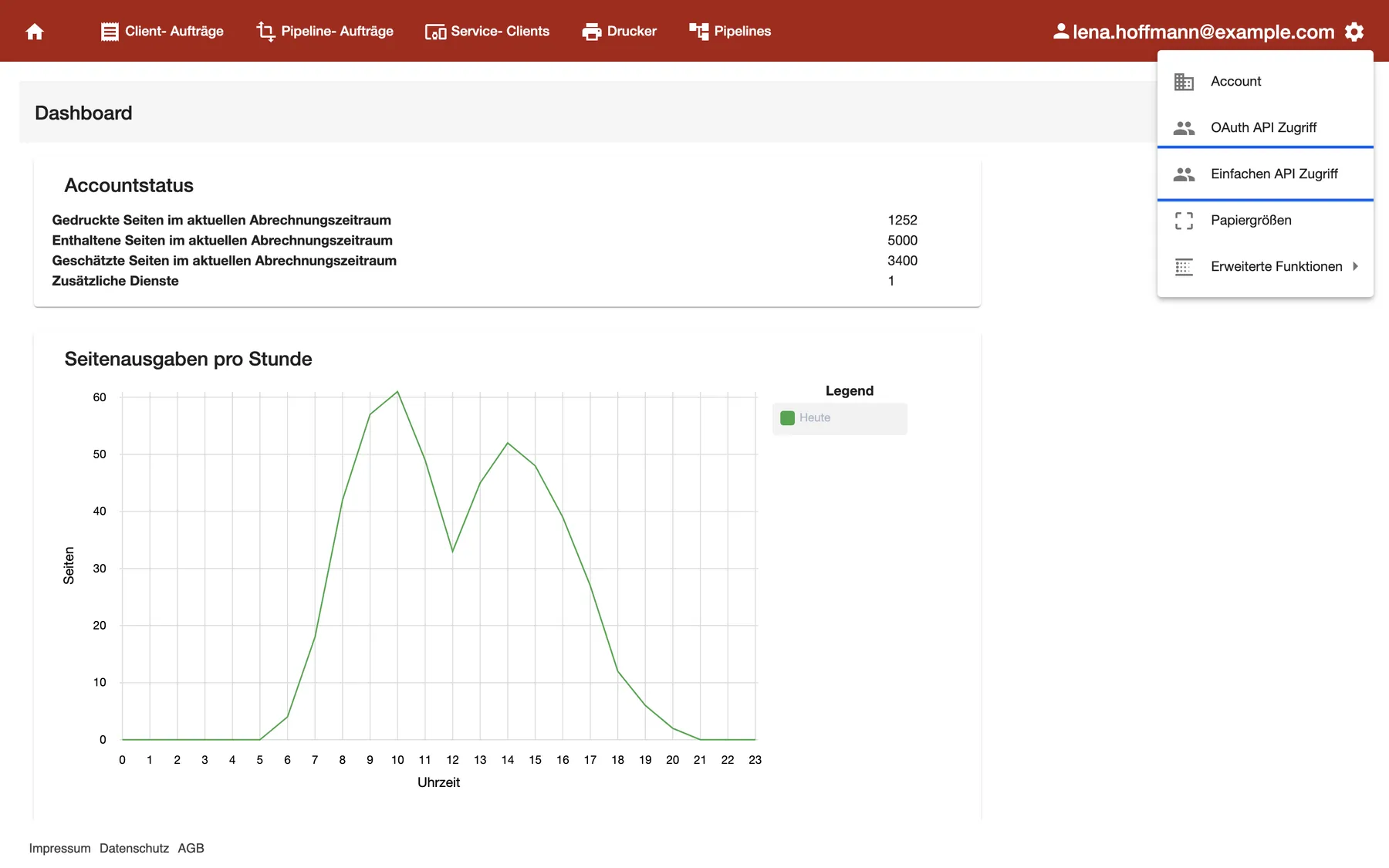
What this screenshot shows
- Screen
- Dashboard
- Highlighted
- “Einfachen API Zugriff”: opens the simple API access list
- Also visible
- Settings menu: Account, OAuth API Zugriff, Einfachen API Zugriff, Papiergrößen, Erweiterte Funktionen; The signed-in user's email next to the gear
- Purpose
- where the API screens are
Select the gear at the right end of the red bar. The settings menu opens with two API entries. The private key opens from the simple access screen.
| Screen | What it shows | What you do there |
|---|---|---|
| OAuth API Zugriffe | Partners approved in the browser, one row each | Switch an access off or on, delete it |
| Einfache API Zugriffe | Credentials with user name and password, one row per partner | Add, edit or delete credentials |
| Privater API Key | Your account’s own key and the areas it may use | Create, switch off or delete the key |
See and switch off partner access
Section titled “See and switch off partner access”A partner lands on OAuth API Zugriffe when someone approves it in the browser. That happens, for example, when you connect Billbee. The list shows every approval made by anyone in your company.
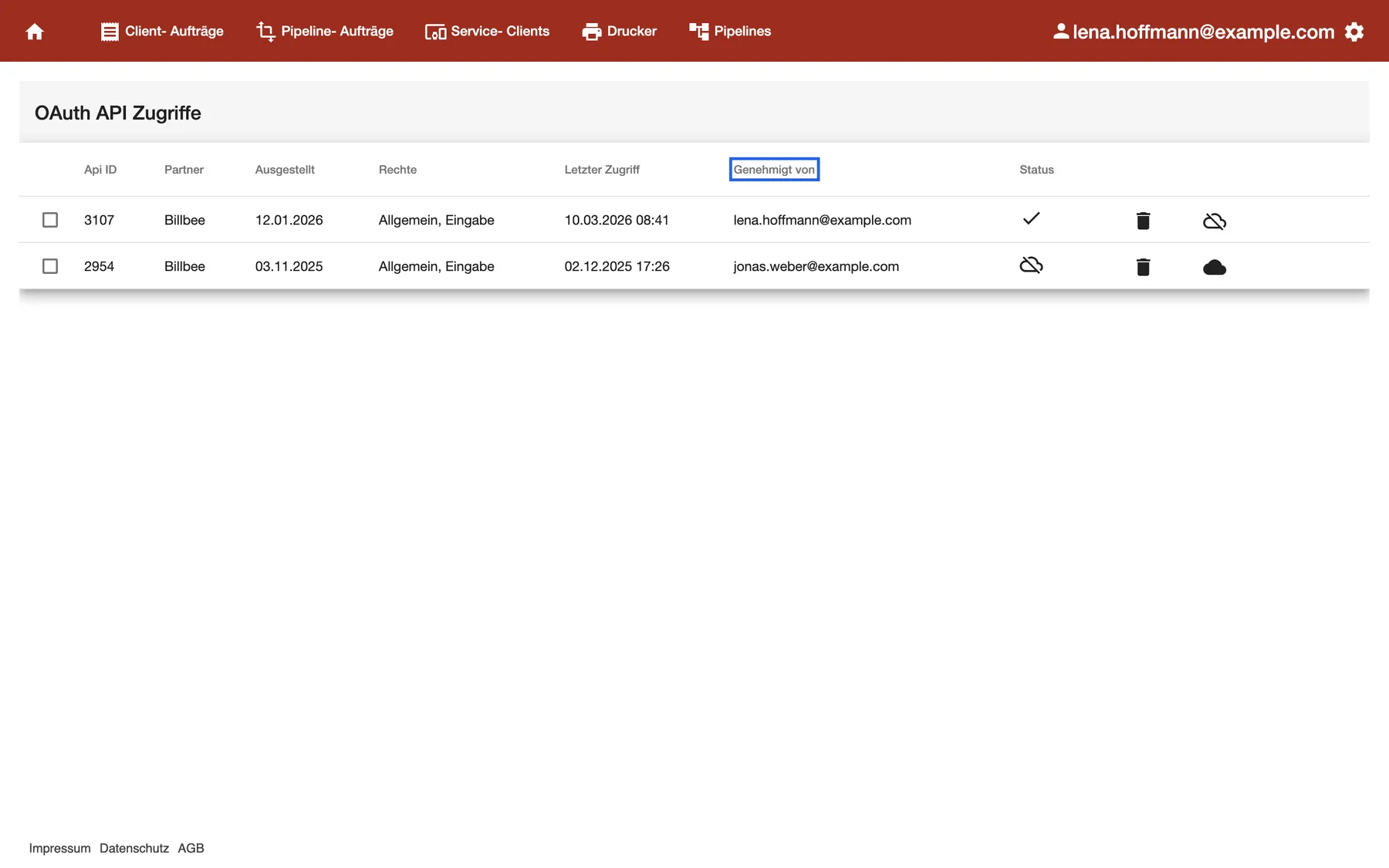
What this screenshot shows
- Screen
- OAuth API Zugriffe
- Highlighted
- “Genehmigt von”: names the person who granted the access
- Also visible
- Two Billbee accesses: 3107 active (tick), 2954 switched off (crossed-out cloud); Bin and cloud icons at the end of each row
- Purpose
- see and control partner access
The Status column shows a tick for an active access and a crossed-out cloud for one that’s switched off.
- Open OAuth API Zugriff from the gear menu.
- In the partner’s row, select the crossed-out cloud at the right end. The dialog API deaktivieren (deactivate API) opens.
- Select Ok. The row’s status changes to the crossed-out cloud.
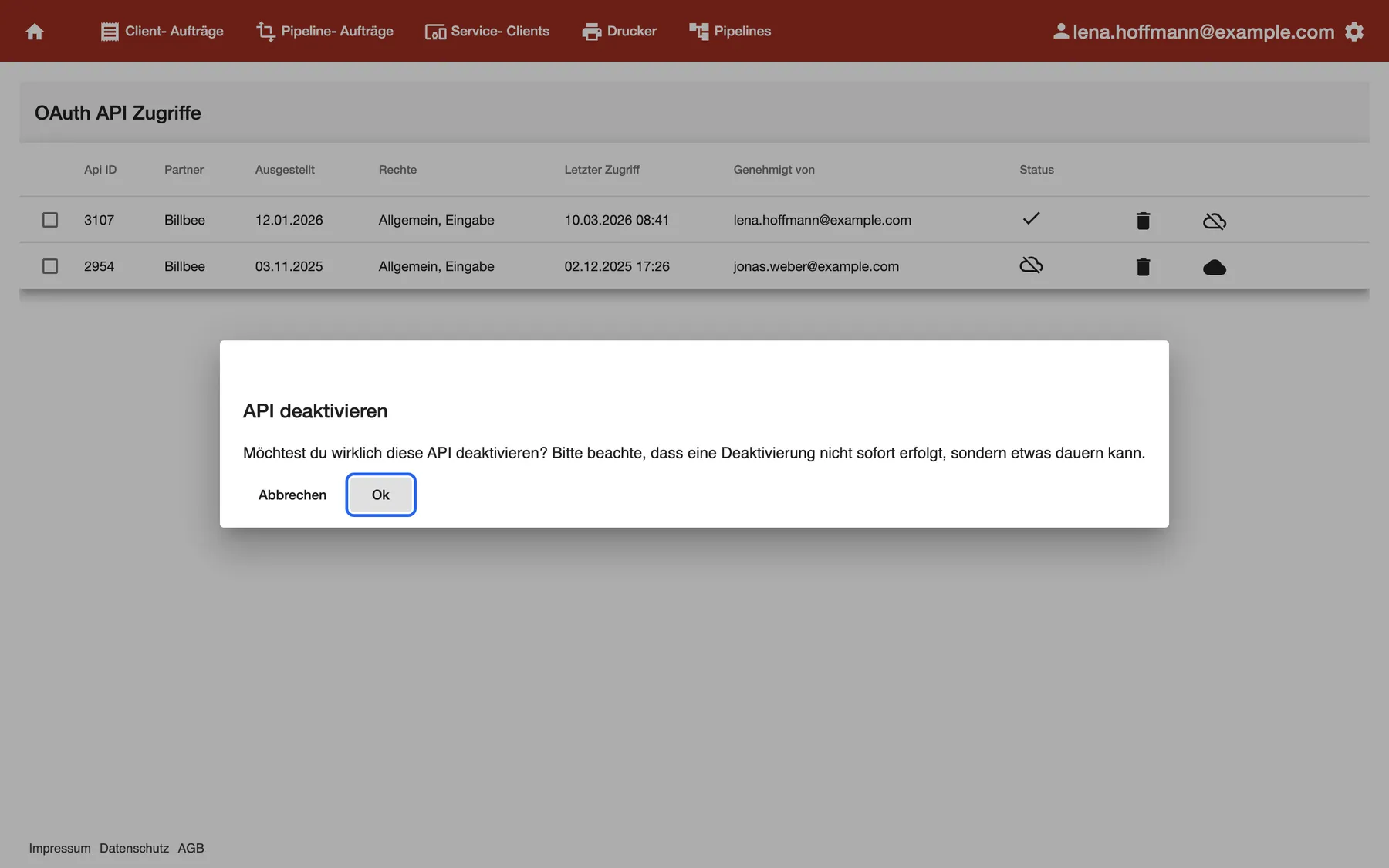
What this screenshot shows
- Screen
- OAuth API Zugriffe
- Highlighted
- “Ok”: switches the access off
- Also visible
- Dialog title API deaktivieren with the warning text; Abbrechen and Ok buttons
- Purpose
- switch a partner's access off
The partner isn’t stopped at once. The dialog says so itself: switching off takes a little while. To switch the access back on, select the full cloud in the same row. That happens without a question.
The bin deletes the access. comrce cloudprint asks first, then removes the row. To connect the partner again later, approve it again from the partner’s side.
Example: Jonas Weber connected Billbee last November, then Lena connected it again in January. Lena switches Jonas’s old access off. Billbee keeps printing through her access, 3107.
Set up simple API credentials
Section titled “Set up simple API credentials”Some partners don’t use the browser approval. They sign in with a user name and a password instead. You create those credentials on Einfache API Zugriffe.
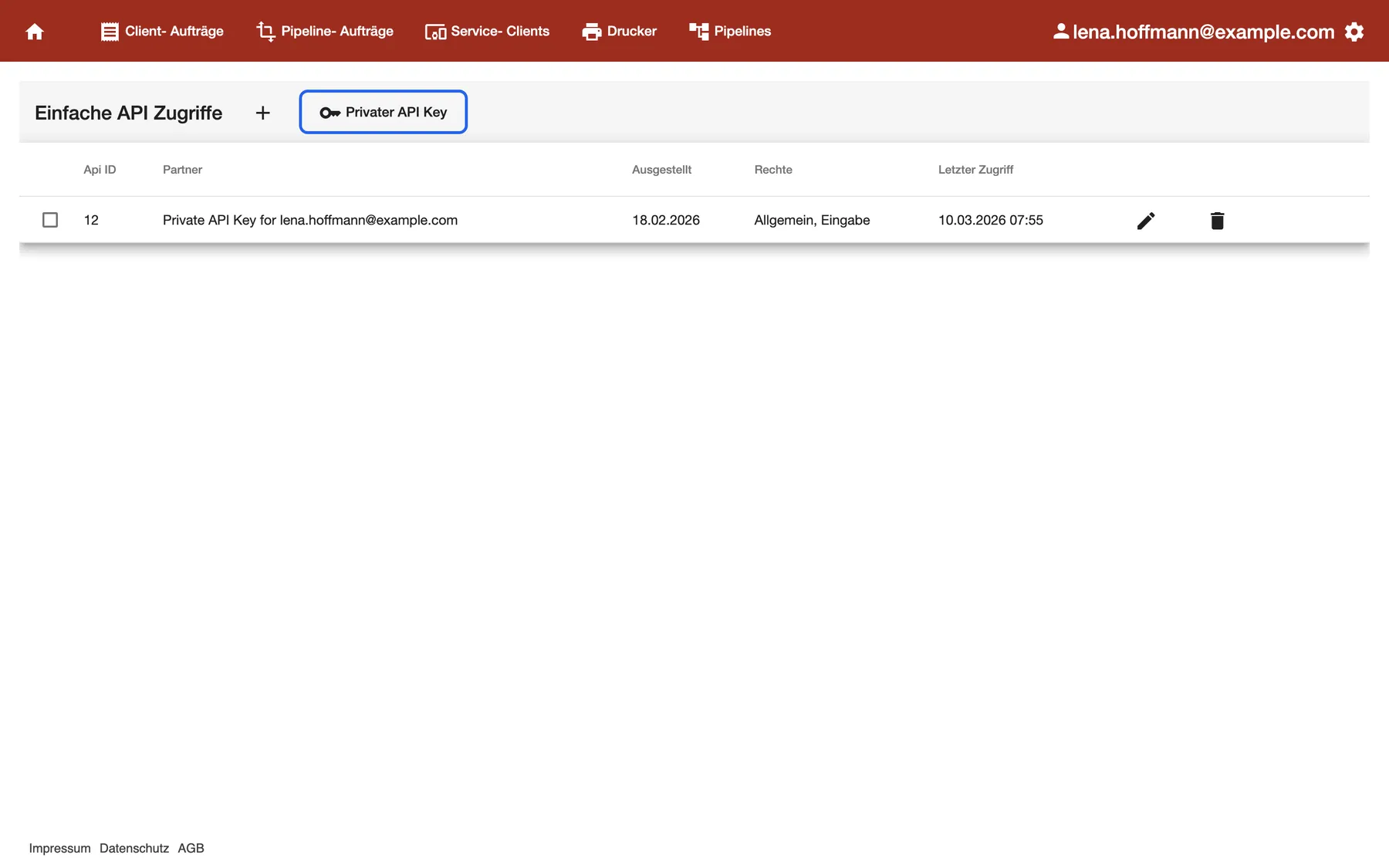
What this screenshot shows
- Screen
- Einfache API Zugriffe
- Highlighted
- “Privater API Key”: opens the private API key screen
- Also visible
- Plus icon to add credentials; One row for the private key partner with edit and delete icons
- Purpose
- manage simple API credentials
- Open Einfachen API Zugriff from the gear menu.
- Select the plus next to the title. The dialog Einfache API hinzufügen (add simple API) opens.
- Under API- Partner, choose the partner. The list holds the partners that allow this kind of access, and your private key once you have one.
- Note the Benutzername (user name). It’s your account number and can’t be changed.
- Enter a password in Passwort setzen (set password).
- Under Berechtigungen (permissions), tick what the partner may do. Then select Ok.
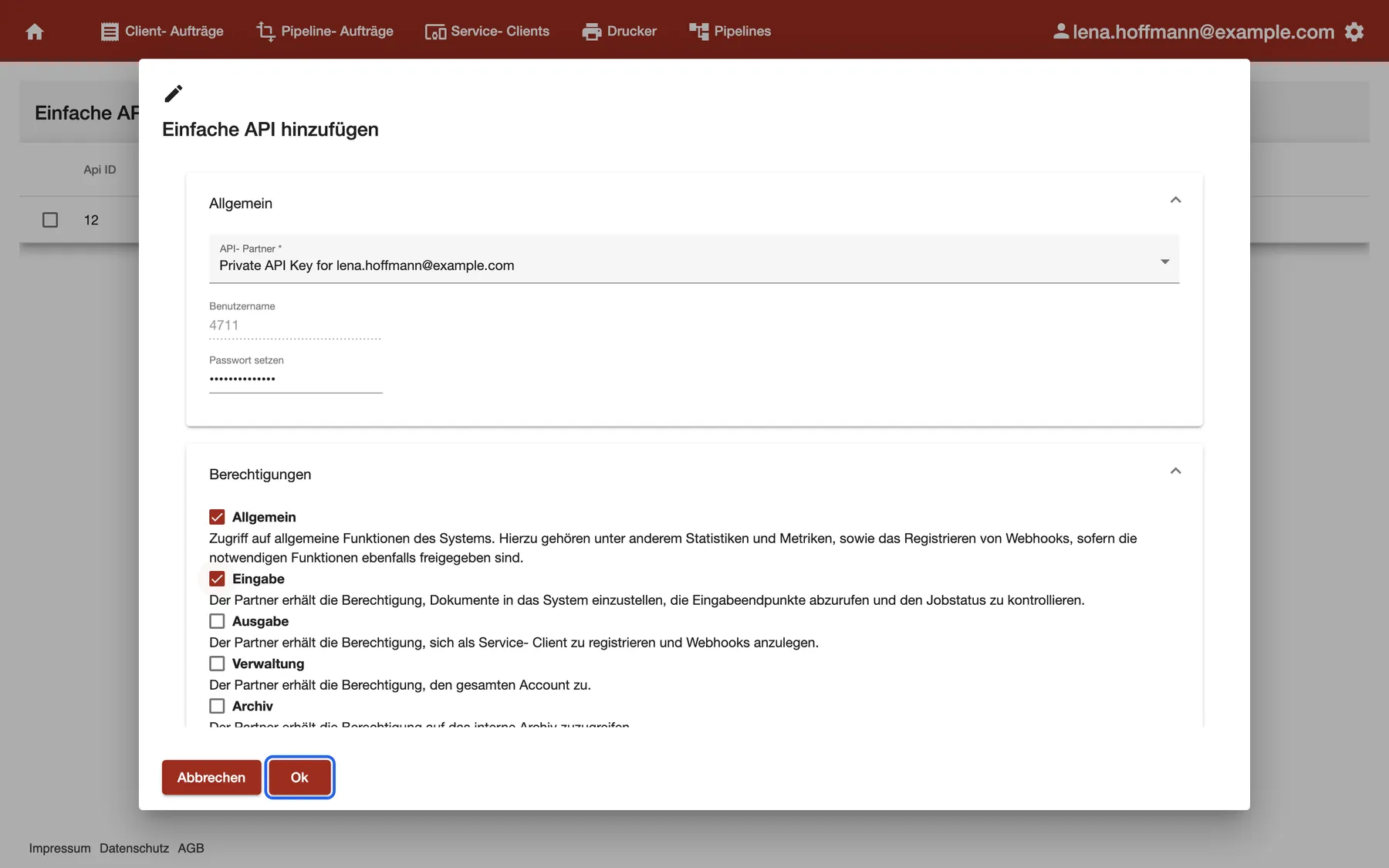
What this screenshot shows
- Screen
- Einfache API Zugriffe
- Highlighted
- “Ok”: saves the credentials
- Also visible
- API- Partner, Benutzername (4711) and Passwort setzen; Permissions Allgemein and Eingabe ticked
- Purpose
- create simple API credentials
The new row appears in the list. Give the partner the user name and the password. The password isn’t shown again, so keep it somewhere safe.
To change the permissions or the password later, select the pencil in the row. The partner can’t be changed there. Leave the password field empty to keep the current password. The bin deletes the credentials after a question, and the dialog warns that this can’t be undone.
Create your private API key
Section titled “Create your private API key”The private key is your account’s own entry to the comrce cloudprint API. Use it for your own software, for example a script that sends delivery notes from your shop system. Open it with Privater API Key on the Einfache API Zugriffe screen.
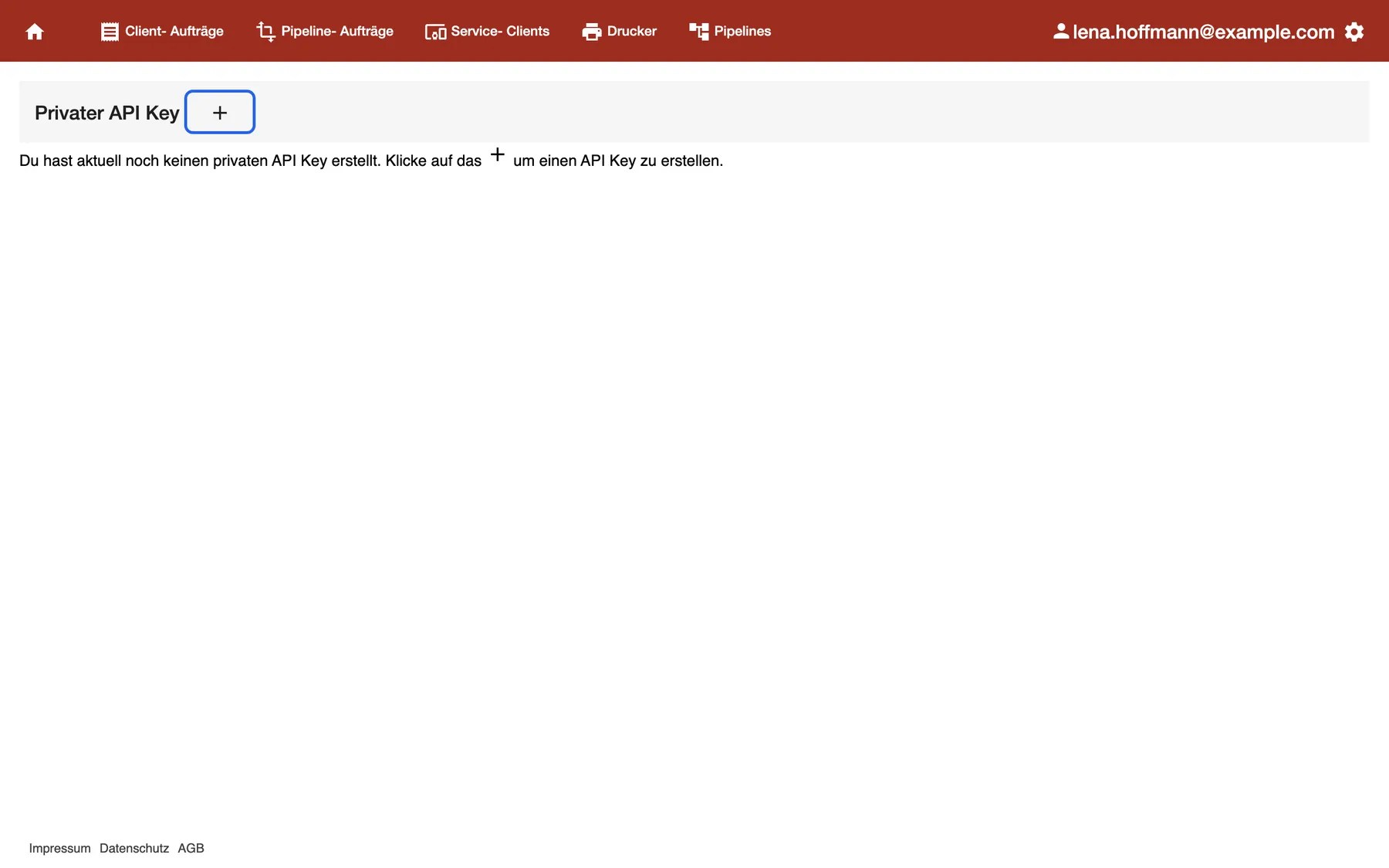
What this screenshot shows
- Screen
- Privater API Key
- Highlighted
- “API Key erstellen”: creates the private key
- Also visible
- Hint that no private key exists yet
- Purpose
- create your private API key
- Select the plus next to the title. The key appears at once, with every area allowed.
- Copy the key from the Key field.
- Under Zugriff auf folgende Bereiche: (access to these areas), keep only the areas your program needs. Then select Speichern.
- Set up simple API credentials for it, as the text on the screen asks. Choose the partner named Private API Key for followed by your email address. See Set up simple API credentials.
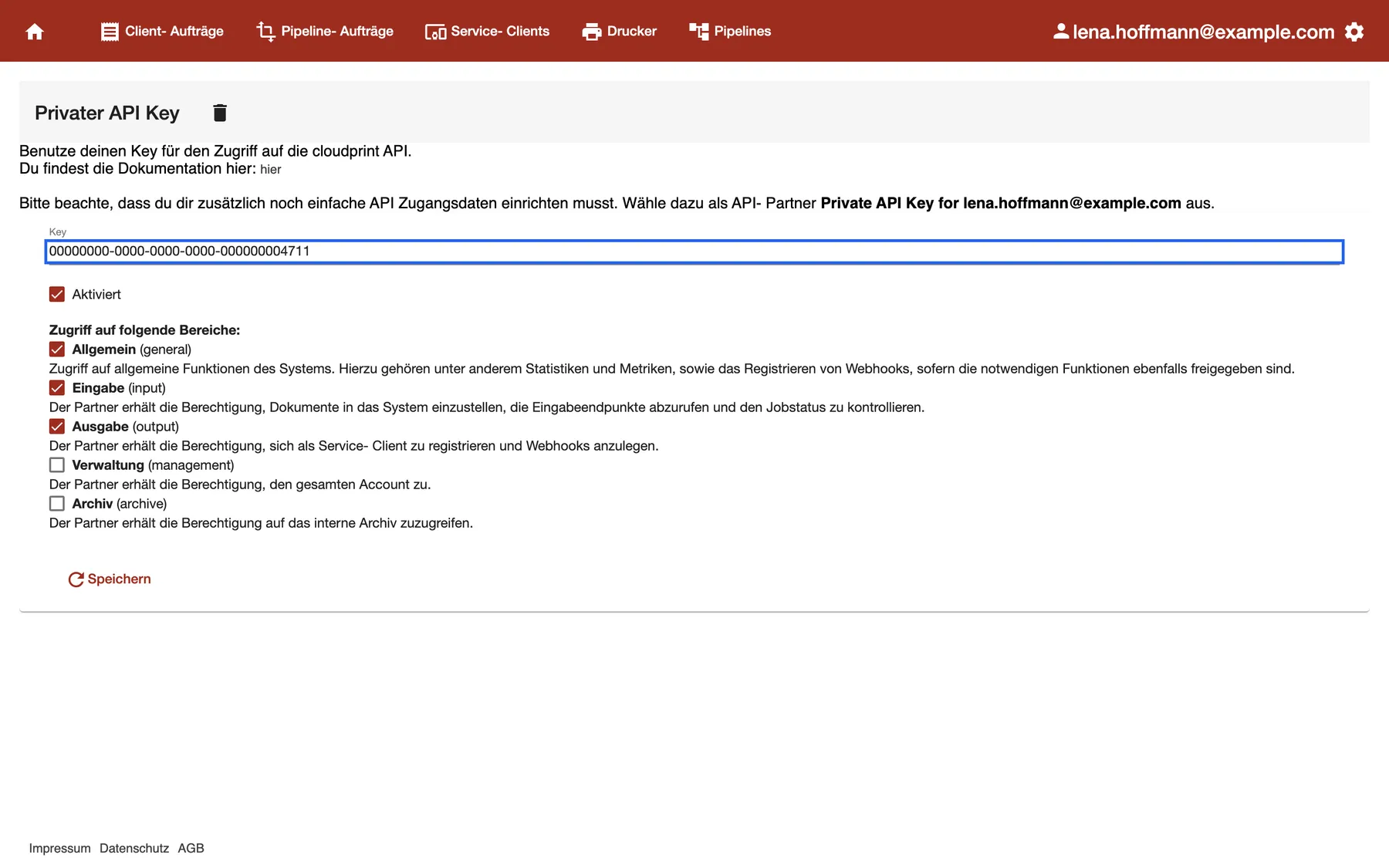
What this screenshot shows
- Screen
- Privater API Key
- Highlighted
- “Key”: shows the key to copy
- Also visible
- Aktiviert ticked; Areas: Allgemein, Eingabe, Ausgabe ticked; Verwaltung, Archiv not; Speichern button and a bin icon next to the title
- Purpose
- your own API key
The link on the screen opens the API documentation in a new tab. Your program then sends the key together with the user name and password of those credentials.
Every control, explained
Section titled “Every control, explained”
Every control, explained
Section titled “Every control, explained”Permissions and areas
Section titled “Permissions and areas”Rechte (permissions) column on both lists, Berechtigungen in the credentials dialog, Zugriff auf folgende Bereiche: on the private key screen. The dialog saves with Ok, the key with Speichern.
comrce cloudprint knows five areas. A partner or program can only use the areas ticked for it.
| Area | What it allows |
|---|---|
| Allgemein (general) | General functions such as statistics and metrics, and registering webhooks |
| Eingabe (input) | Sending documents in, reading the input endpoints and checking the job status |
| Ausgabe (output) | Registering as a Service Client and creating webhooks |
| Verwaltung (management) | Access to the whole account. The description on the screen breaks off mid-sentence. |
| Archiv (archive) | Access to the internal archive |
Tick only what the partner needs. A shop system that sends documents to print needs Allgemein and Eingabe, as Billbee does in the example above.
Status and the cloud button
Section titled “Status and the cloud button”OAuth API Zugriffe, column Status and the cloud button at the end of each row.
A tick means the access is active. A crossed-out cloud means it’s switched off. In an active row, the button shows a crossed-out cloud and switches the access off after a question. In a switched-off row, it shows a full cloud and switches the access on without a question.
Switch an access off when you’re unsure whether a partner should still print, for example after a colleague leaves. You keep the row and can switch it back on.
Genehmigt von and Letzter Zugriff
Section titled “Genehmigt von and Letzter Zugriff”OAuth API Zugriffe, columns Genehmigt von (approved by) and Letzter Zugriff (last access).
Genehmigt von shows the email address of the person who approved the partner. Letzter Zugriff shows the date and time the partner last connected.
An access nobody has used for months is a good candidate to switch off.
Aktiviert
Section titled “Aktiviert”Privater API Key screen, checkbox Aktiviert (enabled). Saved with Speichern.
Untick it and save to stop the key from working, without deleting it. Tick it again and save to bring it back with the same value.
Use it to pause a program for a while. Unlike the bin, you don’t have to update the program afterwards.
Other controls on this page (6)
| Control | What it does | Why |
|---|---|---|
| Tick boxes at the start of each row | Select a row; no action uses the selection at the moment | Nothing to do with them |
| Ausgestellt | The date the access or credentials were created | See how old an access is |
| Partner | The partner’s name | Recognise the partner |
| Pencil (simple access) | Opens the credentials to change permissions or the password | Narrow the permissions, set a new password |
| Abbrechen | Closes the dialog without saving | Leave the credentials as they were |
| Column headers | Sort the list | Find a row in a long list |
Who sees what
Section titled “Who sees what”
Who sees what
Section titled “Who sees what”| Part | Who sees it |
|---|---|
| The gear menu and every screen on this page | The comrce Hub Owner, who becomes the comrce cloudprint administrator at first sign-in |
| Other members of your comrce Hub company | No gear menu, so none of these screens |
What you need to know
Section titled “What you need to know”
What you need to know
Section titled “What you need to know”| Topic | Fact |
|---|---|
| One set per partner | You can add simple credentials for each partner only once. Edit the existing row instead. |
| One private key | Your account has at most one private key. |
| User name | Always your account number, for every set of simple credentials |
| Company-wide | Both lists show the accesses of your whole company, not only your own |
| Switching off | Takes a little while to take effect; switching on happens without a question |
Frequently asked questions
Section titled “Frequently asked questions”
Frequently asked questions
Section titled “Frequently asked questions”General
Section titled “General”What’s the difference between partner access and simple API access?
Section titled “What’s the difference between partner access and simple API access?”OAuth API Zugriff lists partners someone approved in the browser, such as Billbee. Einfachen API Zugriff holds credentials with a user name and password that you create yourself. Both open from the gear menu at the top right of comrce cloudprint.
Why is the Billbee connection listed twice?
Section titled “Why is the Billbee connection listed twice?”Each approval in the browser creates its own row on OAuth API Zugriff. If Billbee was connected twice, both approvals appear. Switch off or delete the one that Letzter Zugriff shows as unused.
Can my colleagues see these screens?
Section titled “Can my colleagues see these screens?”Only the comrce Hub Owner sees the gear menu in comrce cloudprint. Other members of your comrce Hub company don’t see it, so they can’t open these screens from the app.
Partner access
Section titled “Partner access”How do I stop a partner from printing?
Section titled “How do I stop a partner from printing?”Open OAuth API Zugriff from the gear menu and select the crossed-out cloud in the partner’s row. Confirm with Ok. The partner is stopped after a little while, not at once.
Is switching off the same as deleting?
Section titled “Is switching off the same as deleting?”No. A switched-off access keeps its row on OAuth API Zugriff, and the full cloud switches it back on. The bin removes the row. To reconnect the partner after deleting, approve it again from the partner’s side.
Where do I approve a new partner?
Section titled “Where do I approve a new partner?”You don’t approve partners on these screens. The partner sends you to comrce cloudprint, where you confirm the access in the browser. For Billbee, see Print Billbee invoices and labels automatically.
Simple API access
Section titled “Simple API access”What user name does a partner need?
Section titled “What user name does a partner need?”Your account number. The credentials dialog on Einfachen API Zugriff shows it in the greyed-out field Benutzername. It’s the same for every set of credentials.
I forgot the password I set. Can I see it?
Section titled “I forgot the password I set. Can I see it?”No, comrce cloudprint doesn’t show passwords again. Open the credentials with the pencil on Einfachen API Zugriff, enter a new password in Passwort setzen and select Ok. Then give the partner the new password.
Why can’t I choose another partner when I edit credentials?
Section titled “Why can’t I choose another partner when I edit credentials?”The partner is fixed once the credentials exist. For another partner, add new credentials with the plus on Einfachen API Zugriff. Then delete the old row if you no longer need it.
Private key
Section titled “Private key”Where do I find my private API key?
Section titled “Where do I find my private API key?”Open Einfachen API Zugriff from the gear menu and select Privater API Key next to the title. The key is in the field Key.
Is the key enough for my program?
Section titled “Is the key enough for my program?”No. Your program also needs simple API credentials for the partner named Private API Key for and your email address. Create them on Einfachen API Zugriff with the plus.
Can I get the same key back after deleting it?
Section titled “Can I get the same key back after deleting it?”No. A new key always has a different value. Update every program that used the old key, and set up its simple API credentials again. To pause a key instead, untick Aktiviert and select Speichern.
Troubleshooting
Section titled “Troubleshooting”
Troubleshooting
Section titled “Troubleshooting”| Symptom | What to check |
|---|---|
| The gear menu is missing | You’re not the comrce Hub Owner of the company. Ask the Owner to make the change. |
| A partner still prints after you switched it off | Switching off takes a little while. Check the row’s status shows the crossed-out cloud, then wait. |
| Ok does nothing when you add credentials | Credentials for this partner already exist. Edit the existing row with the pencil instead. |
| The partner list in the dialog is empty or lacks your key | Create the private key first on Privater API Key, then open the dialog again. |
| Your program is refused after you deleted the key | A new key has a new value. Put the new key in your program and set up its simple credentials again. |
| The program is refused although the key exists | Check that Aktiviert is ticked and that its credentials use the right password. |